
8:15 a.m.
Hi,
I've discovered a lot of thing about my integrated audio in my MSI K8N
Platinum that has a Creative Sound Blaster Live! 24 bit.
There is a bug in alsa 1.0.8 that prevent the correct detection of MSI
K8N's audio chip.
https://bugtrack.alsa-project.org/alsa-bug/view.php?id=901
Bug will be fixed in 1.0.9 and is just fixed in CVS.
In 2.6 kernel the patch is already in 2.6.12rc1
FROM
http://www.kernel.org/pub/linux/kernel/v2.6/testing/ChangeLog-2.6.12-rc1
<perex(a)suse.cz>
[ALSA] Add support for Audigy2LS on MSI motherboard
CA0106 driver
Add support for Audigy2LS on MSI motherboard.
Fixes Bug #0901
Signed-off-by: James Courtier-Dutton <James(a)superbug.demon.co.uk>
Signed-off-by: Takashi Iwai <tiwai(a)suse.de>
Fedora Core 4 kernel version 2.6.11-1.1191_FC4 has all 2.6.12rc1 patches
(right?) and also alsa patch for MSI.
So I've installed this kernel, now soundcard seems to work but still
this issues:
1) volume control panel won't open (I've used alsamixer to put up the
volume but no luck)
2) if I play an audio file seems to be played well (with old kernel no
soundcard alert popup), but there is no sound.
3) system-config-soundcard still crash (I think it is unrelated to my
audio chip) --> see attachment.
I'm the only one that I've this kind of motherboard and Fedora Core 4
test 1????
help please
Marco
/usr/share/system-config-soundcard/soundcard.py:75: GtkDeprecationWarning: gtk.FALSE is
deprecated, use False instead
self.box = gtk.VBox(gtk.FALSE, 8)
Traceback (most recent call last):
File "/usr/share/system-config-soundcard/system-config-soundcard.py", line 46,
in ?
app = soundcard.childWindow()
File "/usr/share/system-config-soundcard/soundcard.py", line 87, in __init__
self.device, self.module, self.maker, self.model =
self.soundcardBackend.getData(card)
File "/usr/share/system-config-soundcard/soundcardBackend.py", line 106, in
getData
maker, model = string.split(description, " ", 1)
ValueError: need more than 1 value to unpack
12:59 p.m.
1) RESOLVED updating gnome-*
2) seem to be RESOLVED: in xmms with output ALSA sound is bad I don't
know why, with OSS output is OK.
3) NOT RESOLVED
anyone else with my MB to start resolving problems not alone?
bye
Marco
Cimmo ha scritto:
1) volume control panel won't open (I've used alsamixer to
put up the
volume but no luck)
2) if I play an audio file seems to be played well (with old kernel no
soundcard alert popup), but there is no sound.
3) system-config-soundcard still crash (I think it is unrelated to my
audio chip) --> see attachment.

6:51 a.m.
I've got a FC3 up-tp-date with a PCI SB Live 24-bit. In XMMS, configure
the ALSA output plugin with a period time of at most 20 (default is 50).
It works this way for me, but it should be done system-wide somehow as
not all audio apps have this setting. Any audio gurus around?
Cimmo wrote:
2) seem to be RESOLVED: in xmms with output ALSA sound is bad I
don't
know why, with OSS output is OK.
--
Ovidiu Lixandru
linux360
+40 (741) 219234
6:16 a.m.
GREAT!
Thank you! Putting period time at 20 and also disabled the option below
(use mmap I think) now I can hear also with 4.1 speakers without choppy
sound.
Lixandru tell me one thing:
Your analog input works? Because I've an tv card, its output is
connected to te input of my sound blaster live 24 bit, but I cannot hear
any sound with tvtime.
thanx
Cimmo
Ovidiu Lixandru ha scritto:
I've got a FC3 up-tp-date with a PCI SB Live 24-bit. In XMMS,
configure the ALSA output plugin with a period time of at most 20
(default is 50). It works this way for me, but it should be done
system-wide somehow as not all audio apps have this setting. Any audio
gurus around?
7:24 a.m.
Cimmo wrote:
GREAT!
Thank you! Putting period time at 20 and also disabled the option below
(use mmap I think) now I can hear also with 4.1 speakers without choppy
sound.
You're most welcome.
Lixandru tell me one thing:
Your analog input works? Because I've an tv card, its output is
connected to te input of my sound blaster live 24 bit, but I cannot hear
any sound with tvtime.
Haven't tried it yet. I've got a tv card too, so I'll fiddle with it
these days and let you know how it's going. Just be sure it's not a
mixer problem. ;) Also, AFAIR in the Windows drivers that jack was
shared between an analogue line-in input and some digital I/O and you
had to set it in the Creative control panel. Maybe ALSA has a similar
setting.
--
Ovidiu Lixandru
linux360
11:35 a.m.
Ovidiu Lixandru ha scritto:
Haven't tried it yet. I've got a tv card too, so I'll fiddle with it
these days and let you know how it's going. Just be sure it's not a
mixer problem. ;) Also, AFAIR in the Windows drivers that jack was
shared between an analogue line-in input and some digital I/O and you
had to set it in the Creative control panel. Maybe ALSA has a similar
setting.
Have you tried your tv card? Is there some sound?
None for me at the moment in Linux, of course all is ok in Windows :(
Have you joined this discussion? Interesting...
http://forums.creative.com/creativelabs/board/message?board.id=soundblast...
3:36 p.m.
I got around tinkering with my tv card today. It works ok, both video
and audio. The sound comes in through what the GNOME volume applet calls
"Capture feedback into playback". I also used my tuner to capture some
video clips from a Sony Digital8 camera via tv card S-Video + sound card
line-in and it works perfectly.
Cimmo wrote:
Ovidiu Lixandru ha scritto:
>
> Haven't tried it yet. I've got a tv card too, so I'll fiddle with it
> these days and let you know how it's going. Just be sure it's not a
> mixer problem. ;) Also, AFAIR in the Windows drivers that jack was
> shared between an analogue line-in input and some digital I/O and you
> had to set it in the Creative control panel. Maybe ALSA has a similar
> setting.
>
Have you tried your tv card? Is there some sound?
None for me at the moment in Linux, of course all is ok in Windows :(
Have you joined this discussion? Interesting...
http://forums.creative.com/creativelabs/board/message?board.id=soundblast...
--
Ovidiu Lixandru
linux360
9:11 a.m.
Ovidiu Lixandru ha scritto:
I got around tinkering with my tv card today. It works ok, both video
and audio. The sound comes in through what the GNOME volume applet
calls "Capture feedback into playback". I also used my tuner to
capture some video clips from a Sony Digital8 camera via tv card
S-Video + sound card line-in and it works perfectly.
Hey are you sure you have a Live! 24 bit? Capture isn't supported for
this card.
have you snd-ca0106 module for your sound card?
can you make a screenshot of your volume control?
thanx
Cimmo
2:36 p.m.
Yes, I'm very sure it's a Live! 24-bit. It's even written on both the
board, the drivers CD label and driver name in Windows. ;) As I said,
the audio capture works fine with the latest kernel in FC3-updates,
which is:
2.6.11-1.7_FC3
Here's the lspci output for the board:
00:11.0 Multimedia audio controller: Creative Labs SB Audigy LS
Subsystem: Creative Labs: Unknown device 1006
Flags: bus master, medium devsel, latency 64, IRQ 11
I/O ports at d400 [size=32]
Capabilities: [dc] Power Management version 2
A screenshot of the volume control applet:
http://www.linux360.ro/~ovidiu/stuff/volume-applet.jpg
I've found yet another thing which doesn't work as it should: the OSS
emulation. In XMMS, the OSS output is fine, but the mixer (/dev/mixer)
is dead. And I've still got to figure out how to set that period
parameter globally.
Cimmo wrote:

Hey are you sure you have a Live! 24 bit? Capture isn't supported
for
this card.
have you snd-ca0106 module for your sound card?
can you make a screenshot of your volume control?
thanx
Cimmo
--
Ovidiu Lixandru
linux360
6:12 a.m.
Ovidiu Lixandru ha scritto:
And to make thinkgs even clearer:
[root@Iris etc]# cat /proc/asound/cards
0 [CA0106 ]: CA0106 - CA0106
Live! 7.1 24bit [SB0410] at 0xd400 irq 11
Ok, same card (my is integrated your not), same module...
...can you tell me:
1) if you run kmix how many things have you in "input"? I've nothing,
should I have something or not?
2) When you turn on tvtime you give some command line options?
Thanx
Cimmo
4:14 p.m.
Cimmo wrote:
1) if you run kmix how many things have you in "input"?
I've nothing,
should I have something or not?
Don't have KDE installed.
2) When you turn on tvtime you give some command line options?
Nope. I can adjust the line-in volume through the GNOME mixer, however I
can't control it through TVtime. As I said earlier, the OSS mixer
emulator doesn't work.
--
Ovidiu Lixandru
linux360
9:23 a.m.
Ovidiu Lixandru ha scritto:
> 2) When you turn on tvtime you give some command line options?
Nope. I can adjust the line-in volume through the GNOME mixer, however
I can't control it through TVtime. As I said earlier, the OSS mixer
emulator doesn't work.
But how is it called in gnome mixer? I haven't seen anything "line-in"
in your snapshot.
Thanx
10:56 a.m.
Sorry for haven't read very well your previous message :)
But "Capture feedback into playback" for me is the microphone not the
line-in, that they are two different jack in my audio.
In other words:
To listen to your tv card you have putted tv card output audio to mic
jack in the sound card?
Thanx
Ovidiu Lixandru ha scritto:
Quote from an earlier email of mine in this thread:
"The sound comes in through what the GNOME volume applet calls
"Capture feedback into playback"."
11:20 a.m.
On my card it's the same input, as the card documentation specifices.
Mic-in and line-in share the same input. In Windows, the Creative
Surround Mixer lets me choose which type of input is connected. In Linux
it seems to be line-in by default since it works OK like this. I don't
use a mic anyway, so I didn't bother researching this.
Cimmo wrote:
Sorry for haven't read very well your previous message :)
But "Capture feedback into playback" for me is the microphone not the
line-in, that they are two different jack in my audio.
In other words:
To listen to your tv card you have putted tv card output audio to mic
jack in the sound card?
--
Ovidiu Lixandru
linux360
11:31 a.m.
Ovidiu Lixandru ha scritto:
On my card it's the same input, as the card documentation
specifices.
Mic-in and line-in share the same input. In Windows, the Creative
Surround Mixer lets me choose which type of input is connected. In
Linux it seems to be line-in by default since it works OK like this. I
don't use a mic anyway, so I didn't bother researching this.
So for you is different from my panel? (see image)
Damn for me they are two different jacks.
This is why you can hear from your tvcard and I can't :(
Thanx
Cimmo
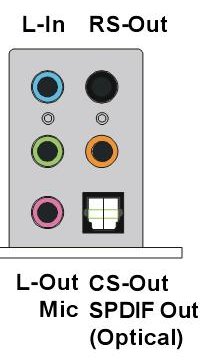
11:36 a.m.
See this:
http://www.creative.com/iss/images/products/headers/prod10315_hdr_1_6_1.jpg
Cimmo wrote:

Ovidiu Lixandru ha scritto:
> On my card it's the same input, as the card documentation specifices.
> Mic-in and line-in share the same input. In Windows, the Creative
> Surround Mixer lets me choose which type of input is connected. In
> Linux it seems to be line-in by default since it works OK like this. I
> don't use a mic anyway, so I didn't bother researching this.
So for you is different from my panel? (see image)
Damn for me they are two different jacks.
This is why you can hear from your tvcard and I can't :(
Thanx
Cimmo
------------------------------------------------------------------------
--
Ovidiu Lixandru
linux360
11:58 a.m.
Ovidiu Lixandru ha scritto:
From the image I cannot view very well, but I downloaded the manual of
your pci live! 24 bit and seen that you have only one jack for mic and
line-in as you said.
Probably I have to request a change from alsa's programmer to provide
support for my specific card (that uses the same chip and of course
module), but I have read that Creative doesn't provide documentation
about this card and I don't know if they can implement it.
Anyway thanx for your answers :)
bye
Cimmo
7:01 a.m.
http://www.alsa-project.org/alsa-doc/doc-php/asoundrc.php?company=Generic...
Here seems that there is a setting you can put to set period time for
every application that uses alsa, I will try...
bye
Cimmo
Ovidiu Lixandru ha scritto:
I've got a FC3 up-tp-date with a PCI SB Live 24-bit. In XMMS,
configure the ALSA output plugin with a period time of at most 20
(default is 50). It works this way for me, but it should be done
system-wide somehow as not all audio apps have this setting. Any audio
gurus around?
6945
days inactive
6965
days old
19 comments
2 participants
participants (2)
-
 Cimmo
Cimmo -
 Ovidiu Lixandru